
Chapter 03
Your desk
Everything you make in Professional is saved as work rather than as a document — filed by kind, pointing at live records, and waiting where you left it.
My Vigil
This is where you return.
My Vigil answers three questions in the order you have them: what needs attention under the things you follow, what you were in the middle of, and what has arrived across your modules since you were last here. It is the only surface in Professional that is about you rather than about the corpus.
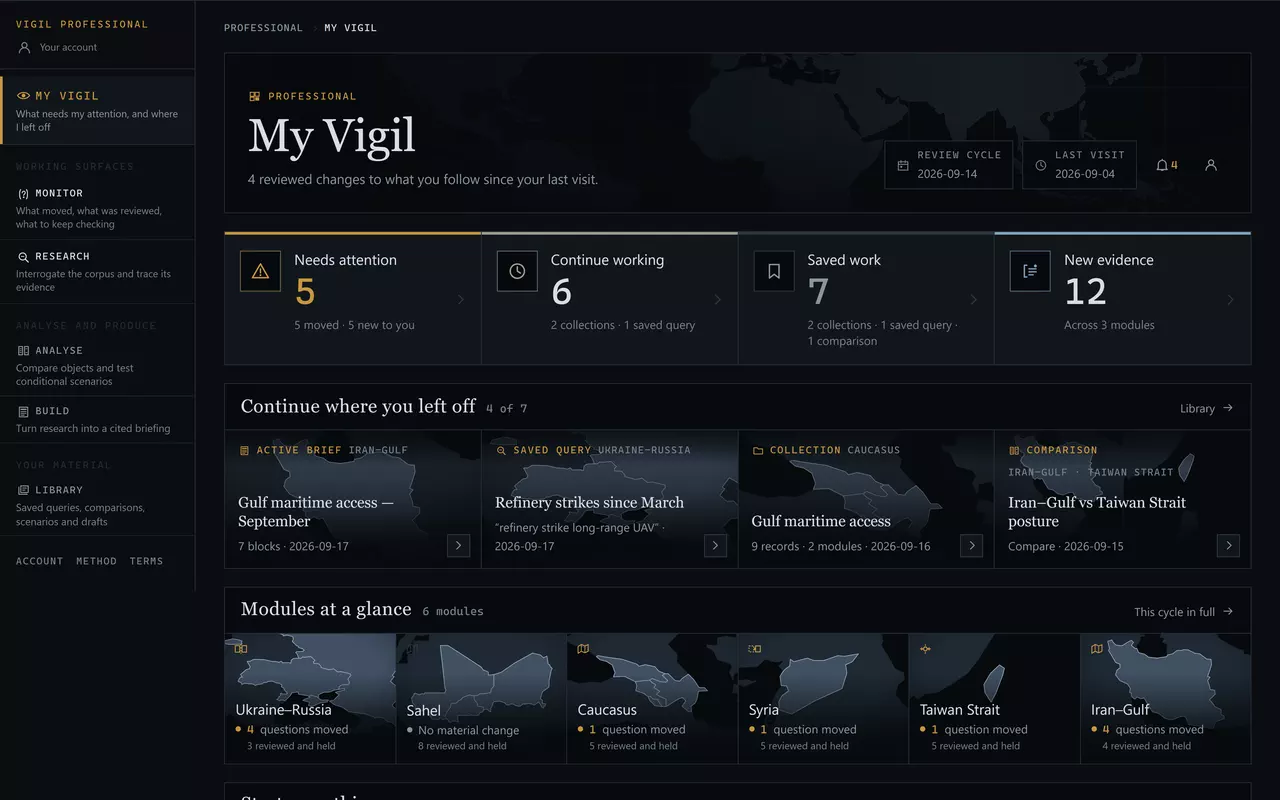
- How many reviewed changes have landed under your follows since your last visit — and when that visit was.
- Needs attention: followed questions whose reviews moved, and anything new to you.
- Saved work and new evidence, as counts you can open.
- Continue where you left off — the four most recent things you were working on, each reopening exactly where it was.
The Modules at a glance row below it is the cycle in one line per module — how many questions moved and how many were reviewed and held — and it is there so that a fortnight away costs a minute rather than an afternoon. Under it, Start something opens the ten tools in the order of the work — Monitor, Investigate, Network, Economy & Logistics, Humanitarian & Resilience, Forces & Operations, Compare, Scenario Lab, Brief Builder, Library — under the names the rail uses.
A new account sees one more thing first: Three moves fill this desk — follow what you are responsible for, trace what a reading rests on, make something somebody else can check — each with the surface it happens on. It is shown only while the desk is empty and goes away as soon as you follow or save anything.
The Library
The same work, filed by kind.
My Vigil shows what is recent and what needs you. The Library shows everything, in sections — and it is where you go to find the thing you made in March.
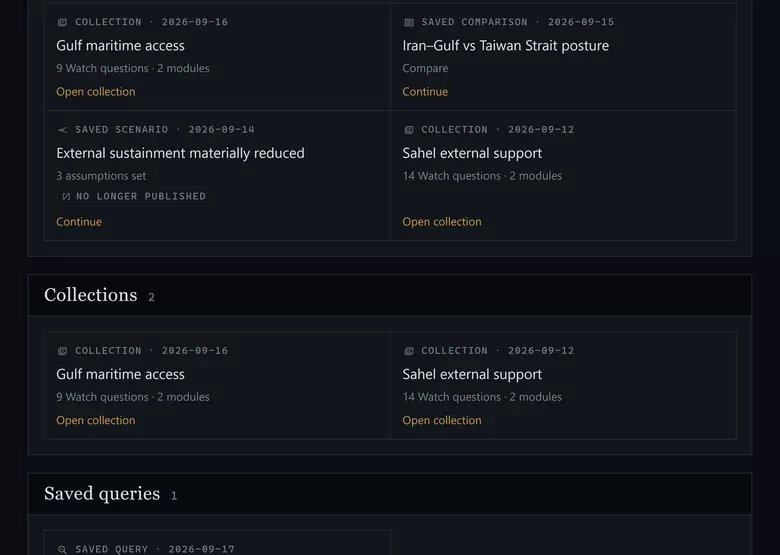
There are 10 kinds of saved work, plus your follows:
- Collection
- Saved query
- Saved comparison
- Saved Tempo view
- Saved scenario
- Brief draft
- Saved timeline
- Private note
- Saved Monitor view
- Saved investigation
A saved view — a query, a comparison, a Tempo view, a Monitor view, a scenario run — stores the tool's configuration, not its results. Reopening it re-runs the tool against the corpus as it is today. That is the behaviour you want: a saved query from six weeks ago should find what the corpus holds now, not what it held then.
What a saved item isA reference, never a copy. If the record it points at is corrected, your item shows the correction; if the record is retired, your item says no longer published and keeps the label it was saved under, so you can see what was there. A saved run whose scenario has been retired is visible in the screenshot above.
Collections
A collection is a named set of canonical records you assembled — the working set for an exposure, a client question, a report. Add to it from anywhere: Investigate, Monitor, an observable, a scenario, the Timeline.
It is the single most useful thing to make in your first week. A collection is what turns "I read about this somewhere" into a set you can reopen, and it is what the Brief Builder draws on when you come to write.
Follows
A follow is a marker you put on a record.
You can follow 4 kinds of object: watch question, observable, tempo series and standing watch. Following changes what is shown to you and what reaches you. It changes nothing else.
What following does not doNo question is reviewed more often, more attentively or differently because somebody is following it. Your selections are not an input to any assessment, and no editor sees them. Personalisation changes delivery, never analysis.
Notifications
A notification is the delivery of a reviewed change. It is not an alert.
You follow
A question, an observable, a series or a standing scope.
Your choice. Reversible at any time.
Vigil reviews
On the cadence the public record states for that question — weekly for most.
Editorial work, on a schedule.
The state moves
The review records material change: the reading moved, an observable was met, evidence was added.
Or it does not, and nothing is sent.
You are told
In the product, and by email if you turn that on. The message names the record and what the review found.
Open it and you are on the record.
That last step is why a silent week is not a fault. If the questions you follow were reviewed and held, there is nothing to deliver — and Vigil does not send a message to say a quiet week was quiet. The desk shows the reviews either way, so you can always see that the work happened.
What notifications are notNot real-time. Not automated threat detection. Not a news feed. There is no monitoring process running between reviews, and no model watching anything. What arrives is what an editor recorded.
The account
Signing in is a link sent to your email address. There is no password to choose, store or lose; a link can be used once and expires fifteen minutes after it is issued.
Your workspace is held with your account and is private to it: nothing you save is readable by anyone else unless you deliberately share it. Work survives sessions and devices — sign in on a second machine and the desk is the same desk.
Professional access requires an active subscription. Cancelling ends the renewal and access continues to the end of the period already paid for. Deleting the account removes the saved work and the account record; cancelling alone does not, and deletion is deliberately refused while access is still running so that nobody deletes an account PayPal is still billing.
Every piece of personal data an account involves is listed field by field in the privacy notice.
Next: Monitor — the cycle, Watch, Standing Watch and Tempo.