
Chapter 06
Network
Network answers one question: how is this system connected, and what does the evidence establish about those connections? Every line on the canvas is one reference that one Vigil record authors, and the record and the field it is written in are always one click away.
What Network represents
A line is a reference a record makes. Nothing else draws one.
Vigil’s records already name one another: a formation names its parent, a relationship record names its two parties, an event names the organisations that took part and the role each played, a strategic system names the routes it depends on, a Watch question names the records it bears on. Network reads those names — each from the field it is written in — and draws them. It holds no data of its own and adds nothing to the corpus.
What it does not representInfluence, importance, closeness or strength. Every record is drawn the same size; placement is a fixed layout and measures nothing; no line carries a weight or a score. Two records that cite the same source, sit in the same module or share a name are not thereby connected. A record with no lines is a record no field names — not a finding that it has no connections in the world.
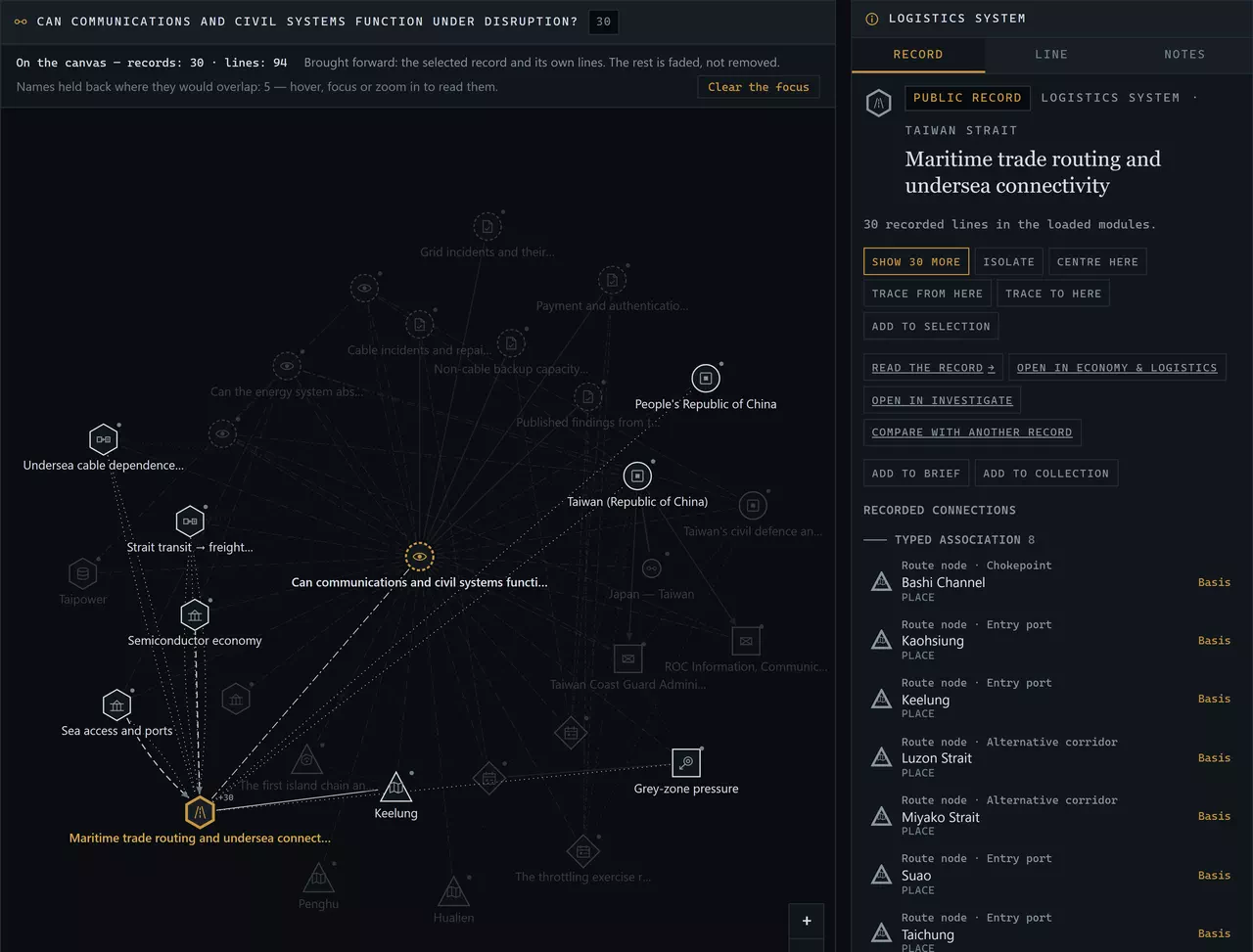
Opening an investigation
Four ways in, none of which needs you to know anything about graphs:
- Search — type part of a record’s name in the toolbar (/ focuses it). Results are listed with their kind and module; records already on the canvas come first.
- A module’s records — the start panel lists each module’s actors, strategic systems, Watch questions and campaigns. Choose one to centre the canvas on it.
- Another workbench — Open in Network in the inspector of Investigate, Monitor, Economy & Logistics, Humanitarian & Resilience and Forces & Operations, and on a Watch question’s Monitor page, opens Network centred on that record.
- Saved work — the start panel, My Vigil and the Library list your saved investigations; each reopens exactly as you left it.
The canvas opens on the record and its immediate lines — the records its own fields name, and the records whose fields name it. That is usually enough to read; expand further only where you need to.
Reading records and lines
A record’s outline says its domain, its icon its kind, its label its name — three marks, so colour is never the only one.
- Political and institutional
- Actors · Countries · Relationship records
- Forces and operations
- Formations and organisations · Equipment · Campaigns
- Events
- Events
- Geography
- Places · Terrain
- Economy and logistics
- Logistics systems · Strategic systems · Industry records · Economic exposures · Impact chains
- Humanitarian and resilience
- Civilian systems and conditions
- Monitoring and analysis
- Watch questions · Analytical Notes · Observables
A line’s pattern says what kind of line it is. The kinds are never merged into a single “connected”, because they are different claims:
- Standing relationship
- A party to a relationship record. The record states the arrangement’s type, direction, status, validity, confidence and sources. Not a measure of closeness or of how well the arrangement works. Status and validity are the record’s; read them before reading the line.
- Structure
- Hierarchy, lineage, containment or the forces an actor’s record names — as authored on one of the two records. A structural line is not an operational command claim unless the record’s own label and authority say so.
- Typed association
- An association in the record’s own controlled vocabulary, with its own grade: equipment held, a place used, an operator, a producer, a route node. The grade printed on the line is the claim. A reported or historical association is not a documented current one.
- Recorded dependency
- A dependency the record states, with its basis — documented (a published source states it) or assessed (Vigil infers it and says so). Not a measure of how much depends, and not evidence that a disruption on one side has occurred or would propagate.
- Dated record
- A dated event, campaign, change or disruption record names this record, with the role it states. Participation in a dated record is not a standing relationship, and an event’s date is not the start or end of anything else.
- Monitoring
- A Watch question, system or industry record names this record as bearing on a monitored question. Not a claim that the two are connected in the world, and not an alert. Network is not a detection engine.
- Reference
- One record names the other in a reference list — an analysis, a relationship’s context, a place a record names. A reference, not a claim of a material connection. It shows where to read further.
- Evidence
- An observable’s evidence or countervailing entry cites this record as its canonical basis. Evidence bears on whether an observable is met; it does not connect the cited record to anything else.
What stands out, and why. With the centre record selected the canvas is an overview: every record and line at the same weight. Select another record and it, with its own lines, is brought forward while the rest fades; a selected line or a traced path is drawn in amber and fades everything not on it. Fading is presentation only — nothing is removed, and a faded record is still one click away. Names are kept at reading size and shown in priority order where they fit: the selected record, the centre, the path and your selection set first, then the selected record’s neighbours. Zoom in and more names fit; hover or focus any record to read its name. The line above the canvas says how many records and lines are drawn, what is brought forward and how many names are held back, and “Clear the focus” returns to the overview.
Evidence lines are Professional’s own. They join an observable to the event or Note its evidence entries cite. The public connection view in Explore does not draw them.
Direction and type
An arrowhead appears only where the type of the line defines a direction in the world: a formation subordinate to its parent, a force sustained by a logistics record, a state that provides material support to another, a system that depends on a route. A relationship record sits between its two parties, so a directed relationship reads through it — from party → record → to party — and a symmetric one (an alliance, a dispute, diplomatic relations) carries no arrow at all.
Every other line has no arrowhead, even though one record wrote it: a Note naming an event, a Watch question naming a formation. The inspector says which record wrote it. The direction of authorship is not a direction in the world.
Basis and limitations
Select a line — or Basis beside any connection — and the inspector answers what it means and what supports it.
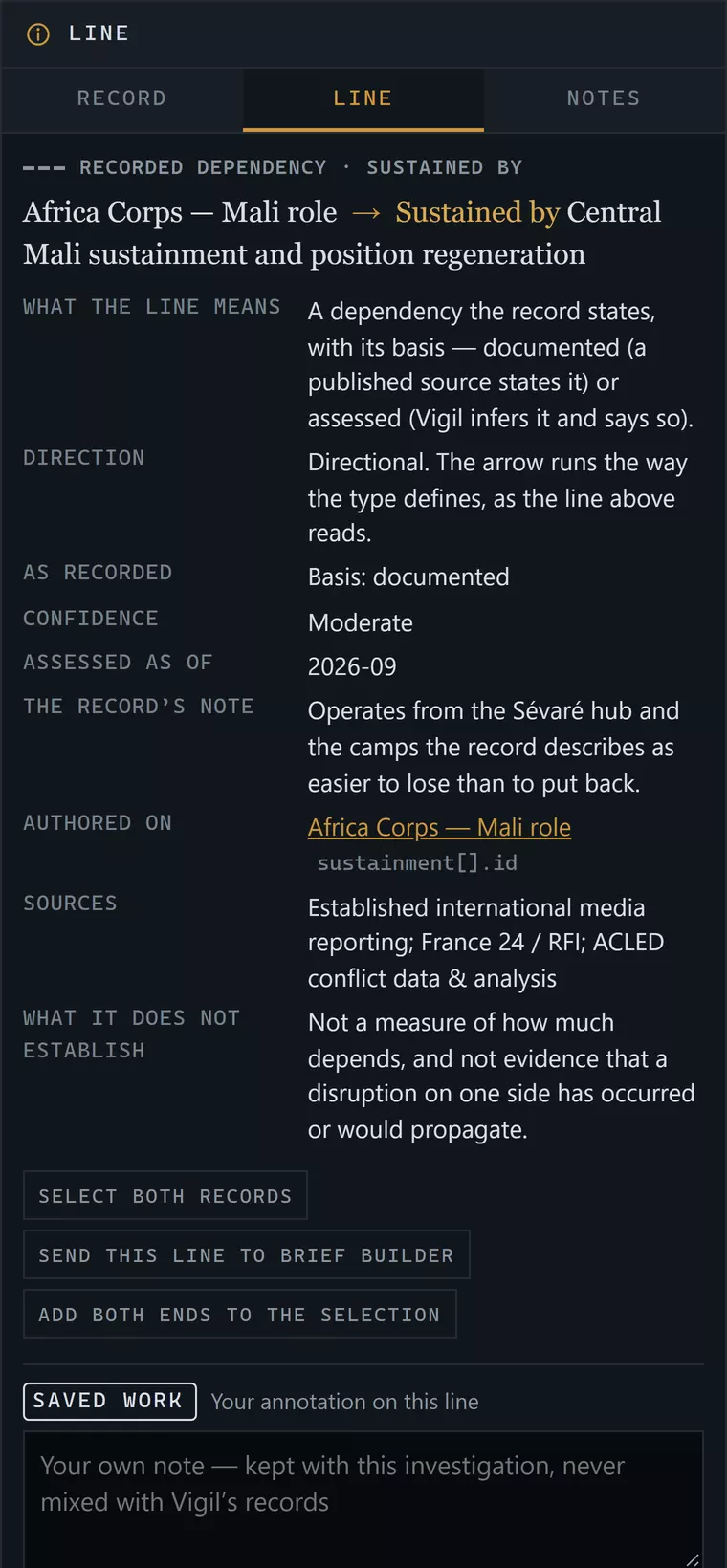
- As recorded — the grade or role in the record’s own vocabulary: Documented, Reported participant, Basis: assessed, a relationship’s status.
- Confidence — the grade the record gives this line, where it gives one.
- Dates — labelled by what they are: Applies (a stated validity), Occurred (the dated record the line belongs to), Period, Assessed as of. A record’s review date is never shown as the start or end of a line.
- Authored on — the record and the field. This is the citation: open the record for its full text and sources.
- Sources — the line’s own, where it cites any; otherwise it rests on the authoring record’s.
- Does not establish — read this line before using the connection in an argument.
Expanding, collapsing and filtering
Select a record and Show more brings its next lines onto the canvas, at most 40 at a time; the count of what is still hidden is printed beside the record. Collapseremoves what an expansion added and nothing another branch still needs.Isolate keeps one record and its own lines;Centre here starts again from it. The canvas holds at most420 records, and says so when you reach the limit — collapse a branch or recentre rather than reading a mass.
Expanding never moves a record already on the canvas, and the same investigation always draws the same picture: placement is a fixed rule (the centre in the middle, its lines on a ring by kind and name, each expansion in an arc away from the centre).
Filters turn kinds of line and domains of record on and off, and limit events to a date range. A filter hides; it never deletes, and the inspector says how many lines a filter is hiding.
Keyboard: Tab to a record, arrow keys to the nearest record in that direction, Enter to select, + to expand, − to collapse, C to centre it; on the empty canvas the arrows pan, +/− zoom and 0 fits. Shift-click or Shift+Enter adds a record to the selection.
Path tracing
A documented path is a chain of references, not a causal chain.
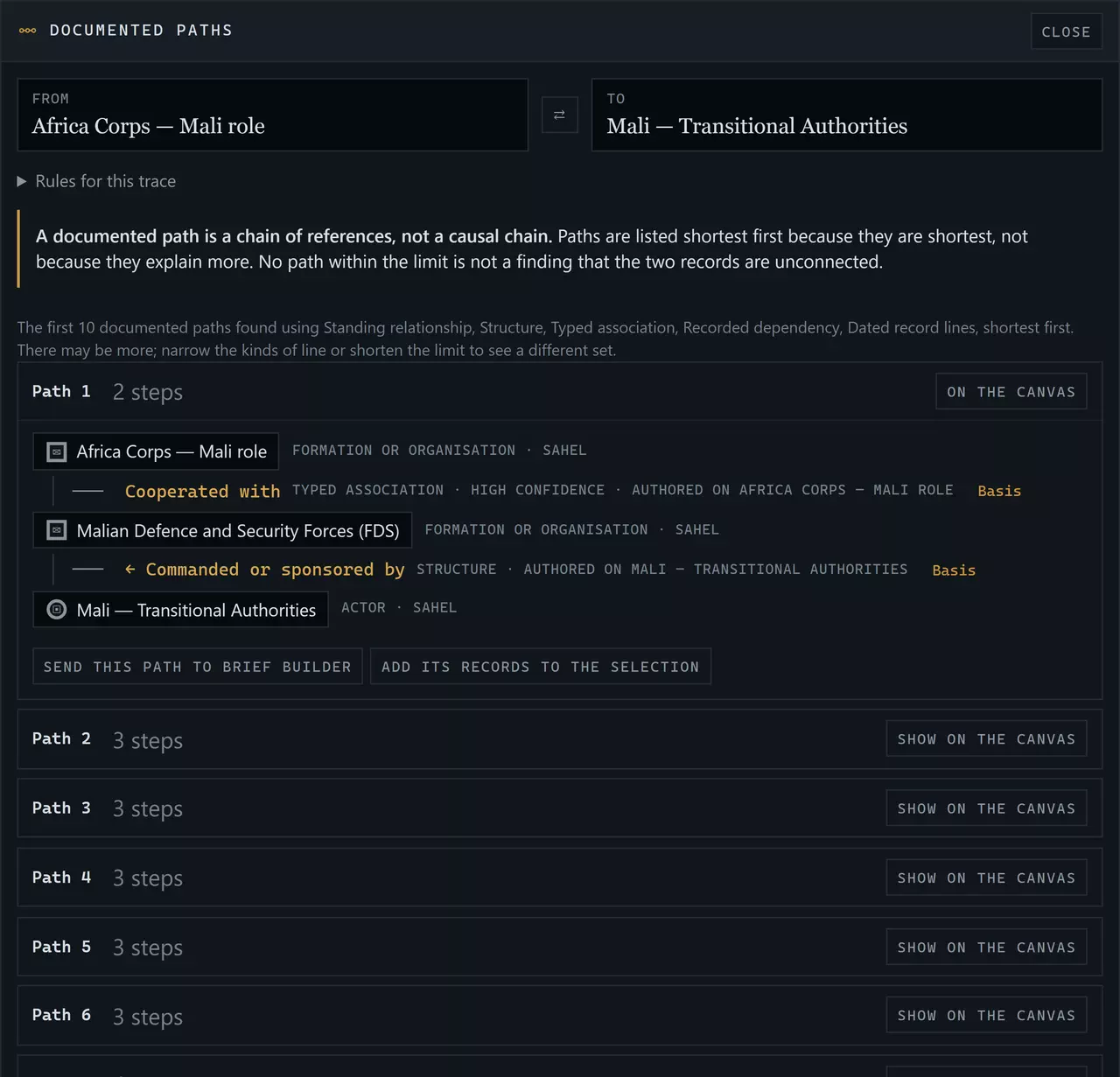
Choose Trace from here on one record and Trace to here on another. Network lists the documented paths between them, shortest first, each step with its basis.
Allowed lines
By default a path uses standing relationship, structure, typed association, recorded dependency, dated record lines. Monitoring, reference and evidence lines are real but are not structure in the world; allow them under “Rules for this trace”.
Bounded
Paths are simple (no record twice) and at most the length you choose. The search stops at a fixed budget and says so if it may have stopped early.
Shortest first
Listed shortest first because they are shortest — not because they explain more. Read the alternatives beside the first.
Nothing invented
If no path exists within the limit, Network says so. That is not a finding that the two records are unconnected.
A path through a country joins one state’s records in two modules (the Russia of the Ukraine–Russia module and the Russia of the Syria module are separate records that name the same country). The path panel says when a path uses that bridge.
Cross-module and cross-domain investigation
Network loads every module in your coverage at once; Modules in the toolbar narrows it. A record that belongs to another module appears when a loaded module’s record names it. Formations, equipment and industry records are shared across modules, so a single canvas can carry a formation, the logistics record its sustainment edge names, the strategic system that route belongs to, a civilian service that rests on the same system, and the Watch question that bears on it — each in its own module’s words, each opening in its own workbench.
Network complements the domain workbenches; it does not replace them. Forces & Operations still owns the command tree, Economy & Logistics the topology of a system and Humanitarian & Resilience the dependence of a service — each opens from Network’s inspector, and each opens Network.
Temporal context
Dates stay attached to what they date. A line shows its stated validity, the date of the record it belongs to, or the date its claim was assessed — each labelled. The date filter acts only on events’ own occurrence dates; a record with no occurrence date is never hidden by it. There is no timeline of the network: the corpus records current structure and dated events, not a continuous history of every connection, and Network does not invent one.
Saving and reopening investigations
Save keeps the investigation in your workspace: the modules, the centre, the records on the canvas and the expansions that put them there, the filters, a traced path, your selection and your annotations. It stores record identifiers, never copies of records — so reopening shows each record as it now stands. A record that is no longer published, or that has moved outside your coverage, is named in the status line and kept in the saved work; nothing you wrote is deleted.
Saved investigations appear in My Vigil and the Library, and reopen from the start panel.
Annotations
Each record and each line has a box for your own note; the Notestab holds a note on the whole investigation and lists every annotation. Annotations are your words: they are labelled SAVED WORK wherever they appear, saved with the investigation, and never mixed with Vigil’s records.
Exports and Brief Builder
- Records and lines — JSON: every record with its canonical id and address, every line with its type, kind, direction, authoring record and field, grade, dates and sources, and the reading rules.
- Lines — CSV and Records — CSV: the same, as two tables.
- Picture — SVG: the canvas as a figure, with its legend and the statement that placement measures nothing. A presentation layout, not a chart.
- Investigation — Markdown: records, lines with their basis, a traced path and your annotations under SAVED WORK.
Each export takes the whole canvas or only your selection. Add to brief on a record adds it as an ordinary block. Send this line to Brief Builder adds a documented connection: it is cited to the record that authors it, so its sources and any later correction are that record’s, and it prints what the line means, the field it rests on and what it does not establish. A selection or a traced path can be sent whole. Nothing is turned into prose about why two records are connected.
Coverage and records you cannot open
Network loads only the modules your coverage includes; the server refuses the others, so their records never reach your browser. A record that a covered module’s record names but that belongs to another module appears with its name and its module, because the covered record already says so — its own lines are drawn only when its module is loaded.
Some record families are not drawn at all, by decision:
- Zones
- Addressable only inside Explore and generalised by construction; the canonical-address decision is still open (canonical.ts ZONE_ADDRESSABILITY).
- Weekly and global briefs
- A brief item names records it reports on. That is a mention in reporting, not a structural reference; drawing it would turn every busy week into a hub.
- Offices and office holders
- Office records are not yet canonical destinations of their own; their holders are already shown on actor records.
- Activity Tempo series
- A series counts records at places; its watch[] links are monitoring metadata, and its records are not canonical nodes.
- Scenarios
- A scenario implication is an authored conditional. Projecting it as an edge would let a path read as a scenario consequence, which Network must never do.
- Sources and citations
- Sources are the BASIS of an edge, printed in its inspector — never nodes. Two records citing one source are not thereby connected.
- Shared module membership, country tags and lens tags
- Being in the same module or carrying the same country tag is not a relationship.
Troubleshooting and accessibility
- The canvas is crowded
- Collapse branches you have read, isolate the record you are working on, or turn off reference and monitoring lines in Filters.
- A record says “+12”
- Twelve more lines are recorded than are shown. Select it and choose Show more.
- A path search finds nothing
- Allow more kinds of line, a longer path, or load more modules. “No path within the limit” is not a finding.
- A saved investigation opens with fewer records
- The status line names the records that are outside your coverage or no longer published. They are kept in the saved work.
- Using it without the canvas
- The List view carries every record and every line on the canvas as tables, each line with its Basis button; the inspector lists every connection of the selected record grouped by kind. Nothing on the canvas is reachable only by pointer.
- Reduced motion
- With reduced motion set, nothing on the canvas animates.
Next: Economy & Logistics — a system as its topology, a flow traced, a chain edge by edge.