
Vigil Professional
Vigil Professional Handbook
How to use Vigil Professional: where to start, what each surface does, how they connect, and what the vocabulary means when you are working in it.
Vigil Professional is one research desk over the corpus Vigil maintains in public — 83 standing questions, 445 observable records and the evidence beneath them, across 8 modules. This manual teaches the desk.
Monitor
What moved this cycle, and what was checked and held.
Reviewed change. Not detection.
Investigate
What a reading rests on, down to dated entries and named sources — and, in Network, how the records connect.
A working surface, not a search box.
Analyse
Two records side by side, or one condition held against the record.
No probability. No forecast.
Produce
A briefing assembled from canonical blocks, with your own words marked as yours.
Exports carry their citations.
Return
Saved work that is still correct when you come back to it.
References, never copies.
Where to start
If you have just signed in, read Quick start: ten steps from an empty desk to a saved briefing, in about ten minutes. If you want to understand the shape of the thing before touching it, read How it works first.
If you have no account and are reading this to find out what the product contains, the walkthrough is a few minutes through how working in it looks, its record page shows one real published record in full, free, and the product page says what the subscription is.
Chapters
- Where do I start?
Quick start
Sign in and get to a saved brief in ten steps. - What am I actually working on?
How it works
One maintained corpus, five working surfaces, and why a correction reaches your saved work. - Where does my work live?
Your desk
My Vigil, the Library, follows and notifications, and what an account holds. - What moved, and what was checked?
Monitor
The review cycle, Watch questions, Standing Watch scopes and Activity Tempo. - What does this reading rest on?
Investigate
Query the corpus, trace evidence, read across modules through a lens, and build a timeline. - How is this system connected, and what does the evidence establish?
Network
The records as a graph of authored references — expand from any record, read the basis of every line, trace documented paths, save an investigation, export it and brief it. - What does this run on, and what happens when it stops?
Economy & Logistics
Six instruments over one model — a system as a summary, a flow as a journey, infrastructure on the map, an industrial base by its claims, a commodity through its system, a chain edge by edge. - Where do civilian systems stand, and what reaches them?
Humanitarian & Resilience
Six instruments over one civilian model — conditions with their dates, access by recorded state, service dependence, displacement as named areas, measures by rung, exposure edge by edge. - How is this force organised, equipped, employed and sustained?
Forces & Operations
Six instruments over the Force Atlas and what connects to it — a force from service to formation, a platform through its variants and formations, doctrine in four registers, the ground and its chokepoints, a campaign phase by phase, what keeps a formation operating. - What follows if I hold this?
Analyse
Compare two records on the dimensions they carry, and hold a condition in Scenario Lab. - How do I produce something somebody else can check?
Brief Builder
Assemble a briefing from canonical blocks, annotate it, and export it with its citations. - What does this label commit Vigil to?
Method in use
What each register means on the screen, how freshness is shown, and what happens when a record is corrected. - What does a real session look like?
Worked workflows
Seven end-to-end examples, each from a first click to a finished output. - Something is not working. What does this word mean?
Reference
Troubleshooting, and a glossary of every term the product uses.
What the desk looks like
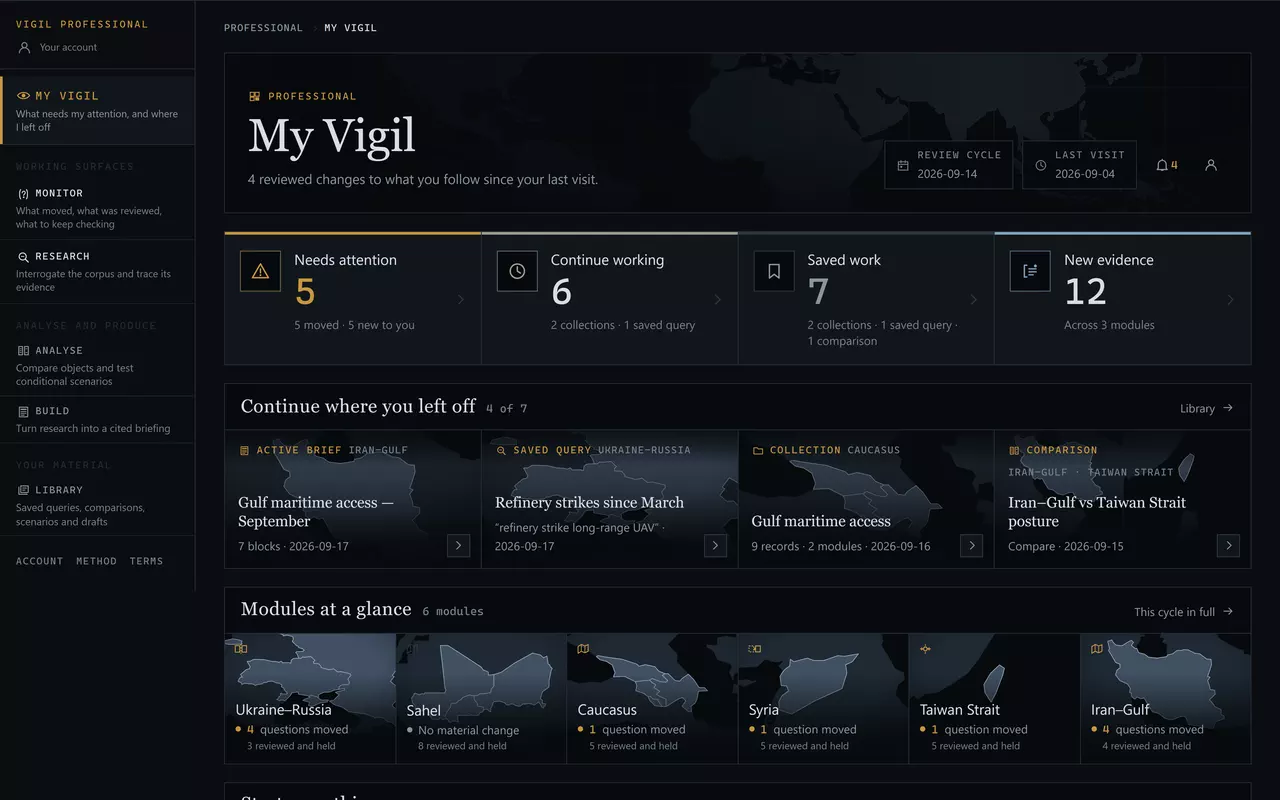
How to read this manualEvery screenshot in it is the real interface over the real corpus, captured from a build of the current product — nothing here is a mock-up or a rendering. Where a screenshot shows saved work, it is a demonstration workspace and the caption says so. Where a figure is stated, it is resolved from the corpus at the moment the page was built.